
Simply Auto: Car Maintenance
MobifolioAuto & Vehicles
4.42.93K Reviews
- Version
- 53.7
- Installs
- 500.00K
- Age Rating
- Everyone
Screenshots
Our Review of Simply Auto: Car Maintenance
 Analysis by Appyee
I like a car-logging app best when it turns small, forgettable moments into useful records without making every drive feel like paperwork. Simply Auto is built around that practical idea: keep fuel, mileage, services, reminders, and trips together so I can make better sense of a vehicle’s running costs and upkeep. It is not a substitute for a mechanic, and it cannot make maintenance decisions for me, but it can make it much easier to remember what I have done and when.
That focus suits the app’s place in the auto and vehicle category. Mobifolio has been developing it since its release in 2013, and it has grown into a well-established option, with over 500,000 installs and a 4.4 average from around 24,000 ratings. It is free to start, rated for Everyone, and offers in-app purchases ranging from $1.49 to $29.99 per item. I would treat those purchases as a reason to check what you actually need before paying, rather than assuming every useful record-keeping task requires an upgrade.
Getting Started with Simply Auto
First things first, downloading Simply Auto is a breeze. Available on both Android and iOS, it installs in a snap. After firing it up, you'll be greeted by a clean interface that’s refreshingly intuitive. No endless menus or confusing icons—just straightforward options that get you where you need to go.
Setting up your vehicle is as simple as entering some basic details. You’ll input your car’s make, model, year, and mileage. The app even lets you snap a picture of your ride, which is a neat little touch. I felt like I was giving my car its own digital passport!
Features That Shine
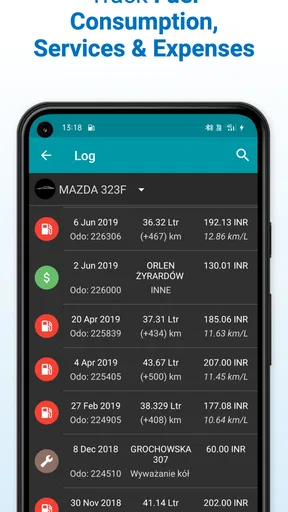
Simply Auto offers a variety of features that make it stand out in the world of car maintenance apps. One of my favorites is the ability to log fuel fill-ups. Every time you stop at the pump, you can quickly record the amount, price, and mileage. The app does the rest by calculating your fuel economy. It’s like having a pocket-sized accountant keeping track of your car’s expenses.
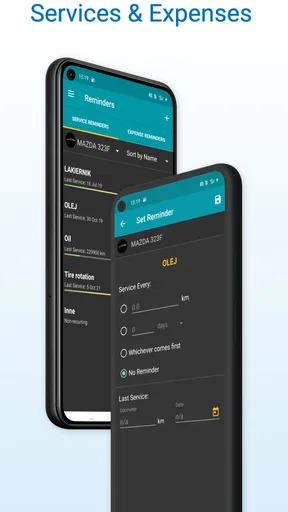
Another feature worth mentioning is the maintenance reminders. You can set notifications for oil changes, tire rotations, and other essential services. The app sends friendly alerts, so you're not left in the lurch when it's time for a tune-up. I found this especially handy because, let's face it, remembering to change the oil isn't exactly at the forefront of my mind.
Driving Insights
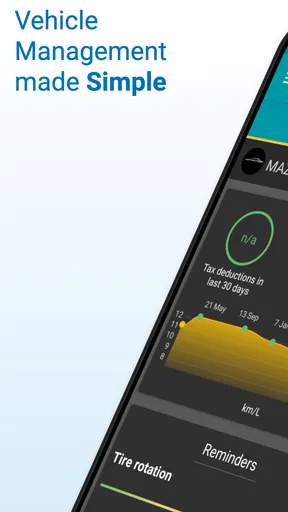
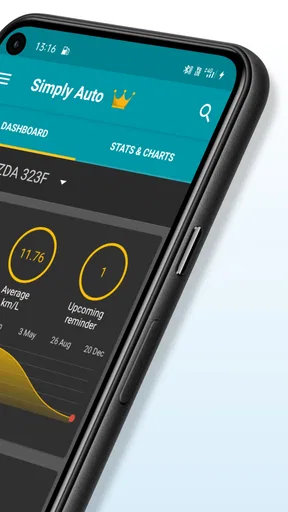
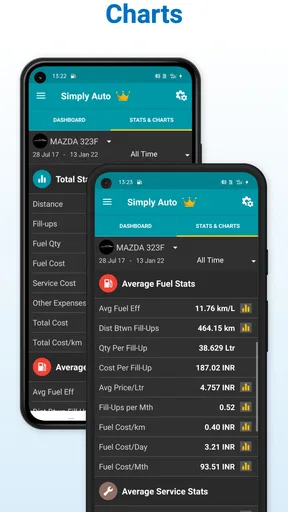
Simply Auto doesn't stop at maintenance tracking. It offers valuable insights into your driving habits. With detailed reports, you can analyze things like average speed, distance traveled, and even fuel efficiency over time. It’s like having a personal driving coach nudging you toward more economical habits without the nagging!
For those who love a good graph or chart, the app provides visual representations of all this data. It's surprisingly satisfying to see your driving habits laid out in colorful, easy-to-understand visuals. Who knew tracking your trips could be so engaging?
The useful part of these reports is not the chart itself but the comparison you can make after building a consistent history. A sudden change in fuel economy might prompt me to check whether my routes, load, or driving pattern have changed before drawing conclusions about the car. One unusually expensive fill-up is not much evidence on its own; several entries across similar driving conditions give the trend more meaning. I would use the numbers as a prompt for a closer look, not as a diagnosis or a reason to ignore a warning light.
There is also a practical habit that makes the records more valuable: enter the odometer reading at the same point in each fill-up routine, ideally while the receipt or pump total is still in front of you. If I wait until later, it is easy to forget a detail or estimate it, and those small inaccuracies can muddy a long-term comparison. Logging only the information I can reliably capture is better than creating a detailed record that quickly becomes patchy.
Social Connectivity
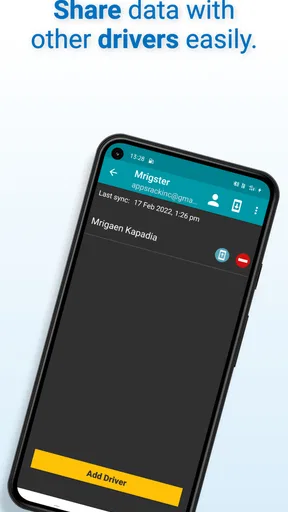
One aspect of Simply Auto that I found unique is its social connectivity feature. If you have a family or fleet of vehicles, you can share data with others. It's great for keeping everyone on the same page about the maintenance status of multiple vehicles. No more frantic group texts or chaotic spreadsheets!
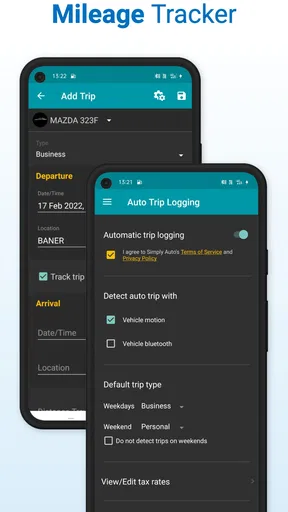
Plus, there's a nifty feature that lets you track expenses and trips collectively, which is a game-changer for families or businesses aiming to streamline their vehicle management.
For a household with more than one driver, shared records are most useful when everyone follows the same simple rule: log a fill-up or service soon after it happens. Otherwise, one person’s careful entries can be undermined by another driver’s missing mileage. I would also agree in advance on what counts as a shared expense, especially if a car is used for both personal errands and work. That small bit of coordination makes the shared view more trustworthy and reduces the need to reconstruct who paid for what later.
A realistic use case is a family member borrowing the car for a long trip and returning it with a fuel receipt or a note about a service stop. Rather than relying on memory, the driver can add the relevant record while the details are fresh, leaving the owner with a clearer vehicle history. For a small business with several vehicles, the same approach can help organize routine records, though it is still sensible to keep invoices and official service paperwork as the authoritative documents. An app log is convenient; it should not be the only place important proof exists.
Choosing the Right Tracking Habit
The app works best when I decide what I want to learn before filling it with entries. If my main concern is fuel spending, I can prioritize fill-ups and mileage. If I tend to miss routine work, maintenance records and reminders matter more. Trying to record every possible detail from day one may make the process feel like an obligation, particularly for someone who only wants a quick reminder before an oil change.
That is the key trade-off with any detailed vehicle log: the insight depends on the consistency of the person using it. A reminder can help me remember a task, but I still need to set it sensibly and update the record after the work is done. For service intervals, I would use the vehicle manual or a mechanic’s advice as the authority, then use the app to keep track of the schedule I have chosen. A generic reminder should not override the requirements for a particular car or its actual condition.
It also helps to think about how much history is worth entering when setting up a vehicle. I would start with the current mileage and the next known maintenance task, then add older records only when I can verify them from receipts or service documents. Guessing at past dates or costs makes a tidy-looking timeline less useful. This is a small but important difference between a genuinely helpful log and a collection of numbers that only appears complete.
Room for Improvement
No app is without its quirks, and Simply Auto has a few areas that could use some polish. While the interface is generally user-friendly, the initial setup can feel a bit overwhelming with the sheer number of features available. A guided tour or tutorial might help first-time users get their bearings more quickly.
Additionally, while the app offers a free version, some of the more advanced features require a premium subscription. This is common with many apps, but it's something to keep in mind if you're on a tight budget.
The broader limitation is that a record-keeping app cannot remove the effort of keeping records. If I regularly forget to enter fill-ups, the fuel calculations and cost history become less dependable; if I ignore reminders, notifications cannot protect the car by themselves. People who want automatic vehicle diagnostics, repair instructions, or a live connection to a mechanic should look at tools designed for those jobs instead. Simply Auto is most convincing as a personal logbook, not as a complete vehicle-care service.
It may also be more than a casual driver needs. Someone who owns one car, visits the same garage, and already follows a simple service schedule might be perfectly happy with a calendar reminder and a folder for receipts. That approach takes less setup and has fewer entries to maintain. I would choose this app when I want fuel trends, trip or expense records, or a shared view across vehicles—not merely because I need one annual reminder.
Version 53.7 supports devices running Android 5.0 or later, so the app is not limited to the newest phones. Still, before relying on any phone-based log for a long-term vehicle history, I would keep essential receipts and service records separately. That is a sensible backup habit for any tracking tool and makes it easier to verify an entry if I later sell the car or need to discuss past work with a repair shop.
Who Gets the Most from It
I would recommend Simply Auto to drivers who want more than a bare reminder but do not need a specialist fleet-management system. It is especially useful if you pay for fuel yourself, share a car with family, manage more than one vehicle, or want a single place to review services and running costs. A used-car owner can also benefit from starting a careful log now, even if the earlier history is incomplete: a reliable record from today is more helpful than trying to reconstruct years of maintenance from memory.
On the other hand, it is not the best match for someone who dislikes manual entry, wants their vehicle monitored automatically, or only needs occasional calendar alerts. The choice between Simply Auto and a notes app or spreadsheet comes down to how much structure you want. A spreadsheet can be more flexible, but it takes work to build and interpret; a basic notes file is quick, but it will not provide the same dedicated fuel and vehicle-history focus. For me, the app’s advantage is keeping those recurring records organized without turning the process into a custom project.
Final Thoughts
All in all, Simply Auto is a robust tool that makes vehicle maintenance less of a chore and more of a streamlined process. With its range of features and user-friendly design, it’s a must-have for anyone looking to take the hassle out of keeping their car in top shape.
Whether you're a car enthusiast or just someone who wants to avoid breakdowns, this app has something valuable to offer. So, go ahead and give it a spin—your car (and your wallet) will thank you!
My recommendation is a little narrower: start with the free option, choose one or two records you will genuinely keep up with, and see whether the resulting history changes a decision you make about the car. If it does, adding more detail may be worthwhile; if it becomes another chore, a calendar and organized receipts may suit you better. For drivers who value a dependable overview of fuel, mileage, expenses, and maintenance, that modest routine is where Simply Auto earns its place.
Verdict
Strengths of Simply Auto: Car Maintenance
- User-friendly interface for easy navigation.
- Comprehensive maintenance tracking features.
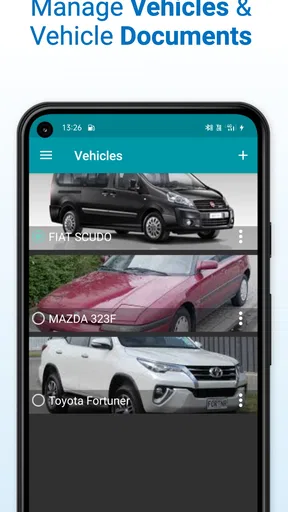
- Supports multiple vehicles in one account.
- Automatic mileage tracking via GPS.
- Cloud backup for data security.
Limitations of Simply Auto: Car Maintenance
- Limited features on free version.
- Occasional sync issues reported.
- Requires data entry for full functionality.
- Some features need premium upgrade.
- Notifications can be overwhelming.
Similar Picks in This Category
View All
Android Auto
Google LLC4.1

maxim — order a taxi & food
PT. SITO4.7

Штрафы ГИБДД: проверка с фото
Pays LLC – Штрафы ГИБДД4.7

Номерограм – проверка авто
Авто Ассист4.8

Дром Авто
Дром4.9

Frequently Asked Questions
What features does Simply Auto offer for vehicle management?
Simply Auto provides a comprehensive set of features for vehicle management, including fuel tracking, mileage logs, expense recording, and maintenance reminders. Users can also sync data across devices, generate detailed reports, and set up multiple vehicles. The app supports both personal and business use, making it versatile for various needs.
How does Simply Auto help with fuel efficiency?
Simply Auto assists users in monitoring fuel efficiency by logging fuel entries and calculating mileage. It provides insights into fuel consumption patterns, allowing users to identify inefficiencies. The app can generate reports that highlight trends over time, helping users to make data-driven decisions to improve their vehicle's fuel efficiency.
Is Simply Auto compatible with both Android and iOS devices?
Yes, Simply Auto is available for both Android and iOS platforms. Users can download the app from Google Play Store for Android devices and the Apple App Store for iOS devices. Data synchronization across platforms is seamless, allowing users to access their information on any supported device.
Can Simply Auto handle multiple vehicles and drivers?
Absolutely, Simply Auto is designed to accommodate multiple vehicles and drivers. Users can manage different cars or bikes within a single account. The app allows for adding multiple drivers, making it ideal for families or businesses with shared vehicles. This feature ensures all vehicle-related data is organized and easily accessible.
Is there a cost associated with using Simply Auto, and are there premium features?
Simply Auto offers a free version with basic features. However, to unlock advanced functionalities, such as cloud backup, ad-free experience, and enhanced reporting, users can opt for a premium subscription. The premium version provides additional value for those who need more extensive vehicle management tools, ensuring a comprehensive experience.
